WooCommerce plugin
Accounting Export for WooCommerce
Export your WooCommerce orders as double-entry journal entries, balanced to the cent, in the import format of your accounting software: DATEV, Xero, QuickBooks, Sage, Exact Online, SAP and more.
From WooCommerce orders to journal entries
WooCommerce records orders, not accounting entries. Every month, someone has to re-key the sales, split VAT by rate, match payments and payment gateway fees, then handle refunds. It takes time, and every manual entry is a chance for an error.
Accounting Export for WooCommerce generates the import file of your accounting software directly. Your accountant sets up the chart of accounts once; the shop then produces its monthly export in a few clicks, or receives it automatically by email. No API connection, no sync to maintain: a clean file you import like any other journal.
How it works
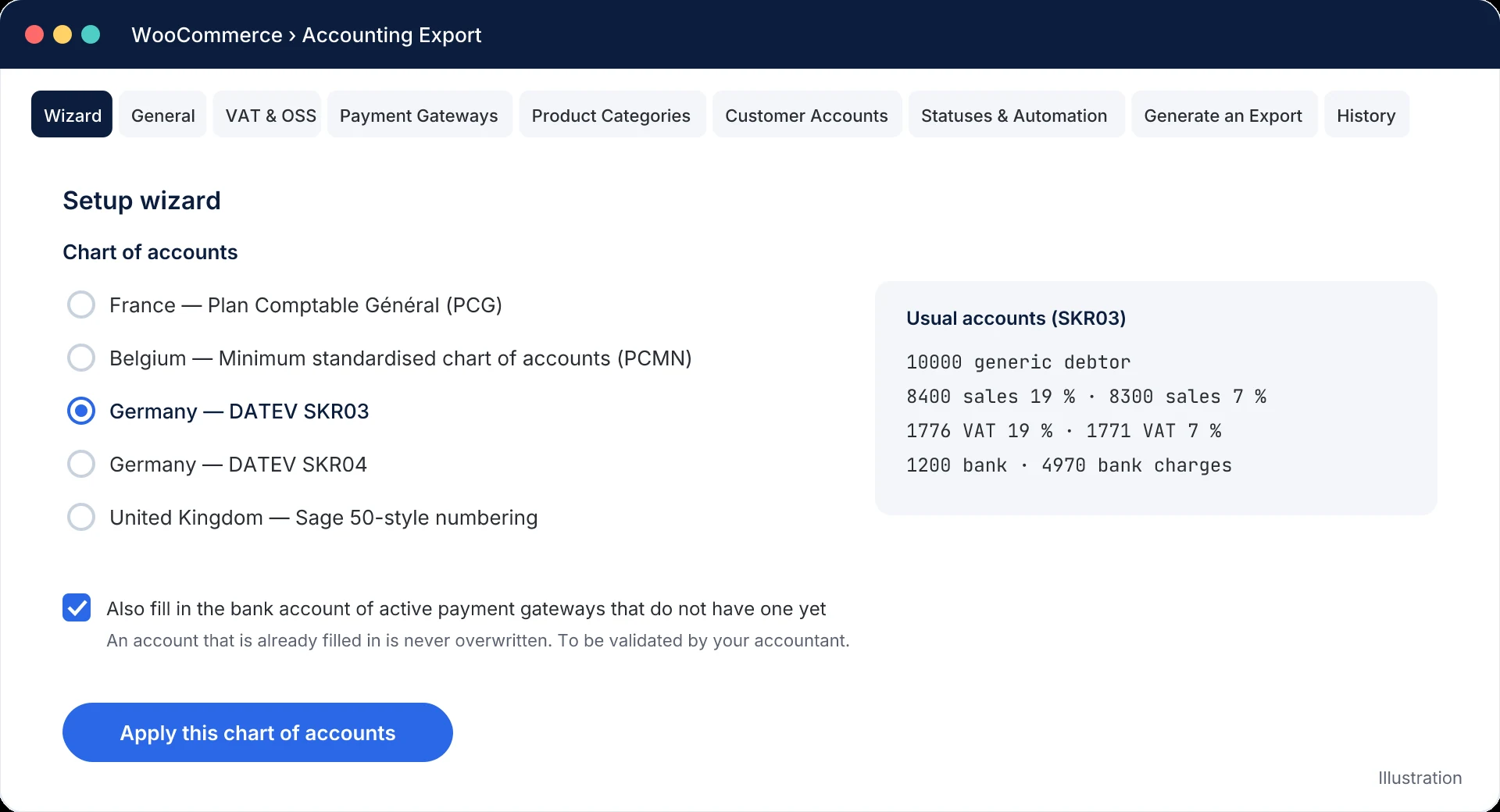
- Pick your chart of accounts. The setup wizard pre-fills accounts and journals: France (PCG), Belgium (PCMN), Germany (DATEV SKR03 or SKR04) or United Kingdom (Sage 50-style numbering).
- Fine-tune with your accountant. VAT per rate, a bank account per payment gateway, sales accounts per product category, customer accounts.
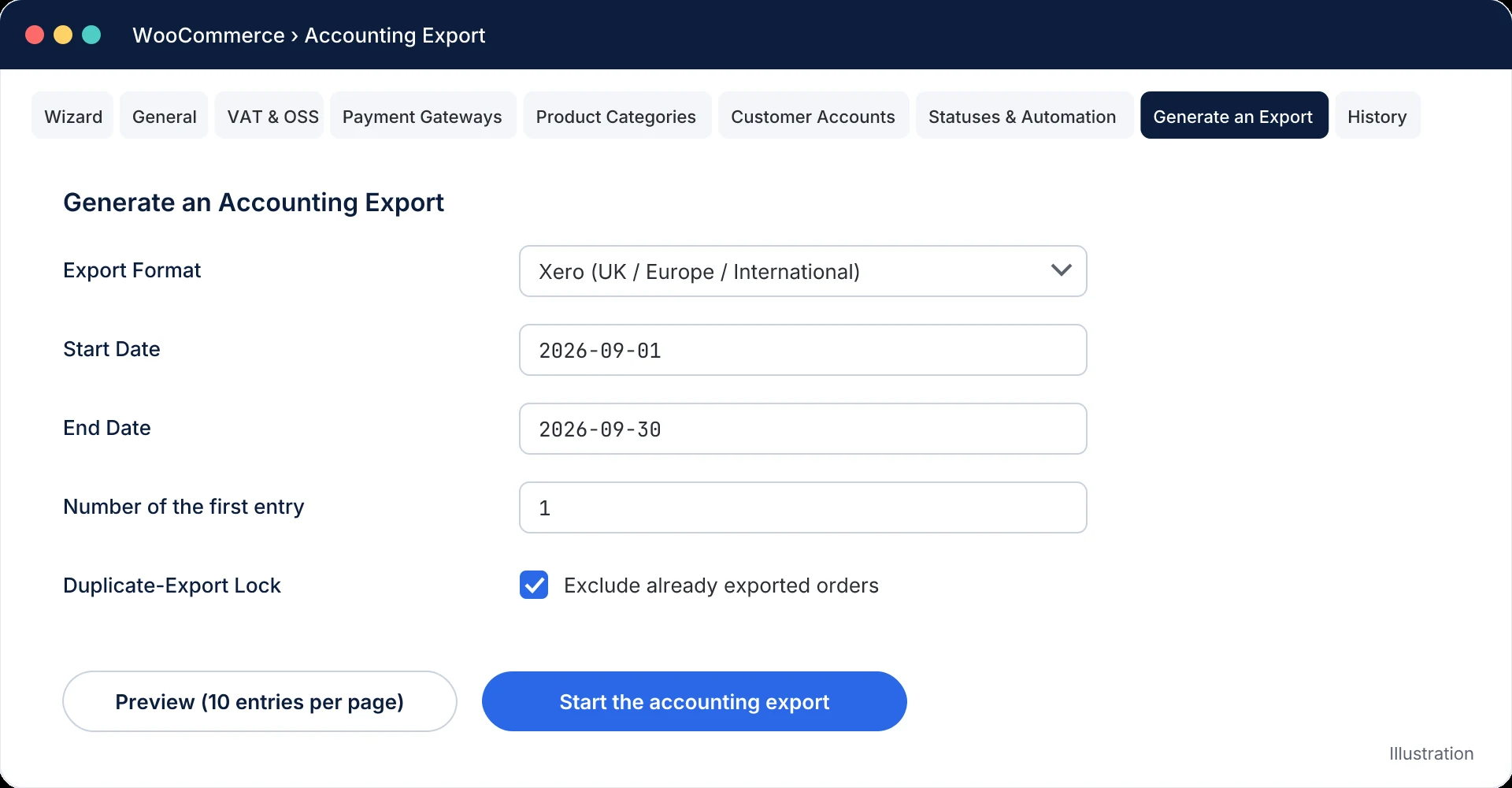
- Preview. The preview shows the complete entries of the period, without locking anything or using up an invoice number.
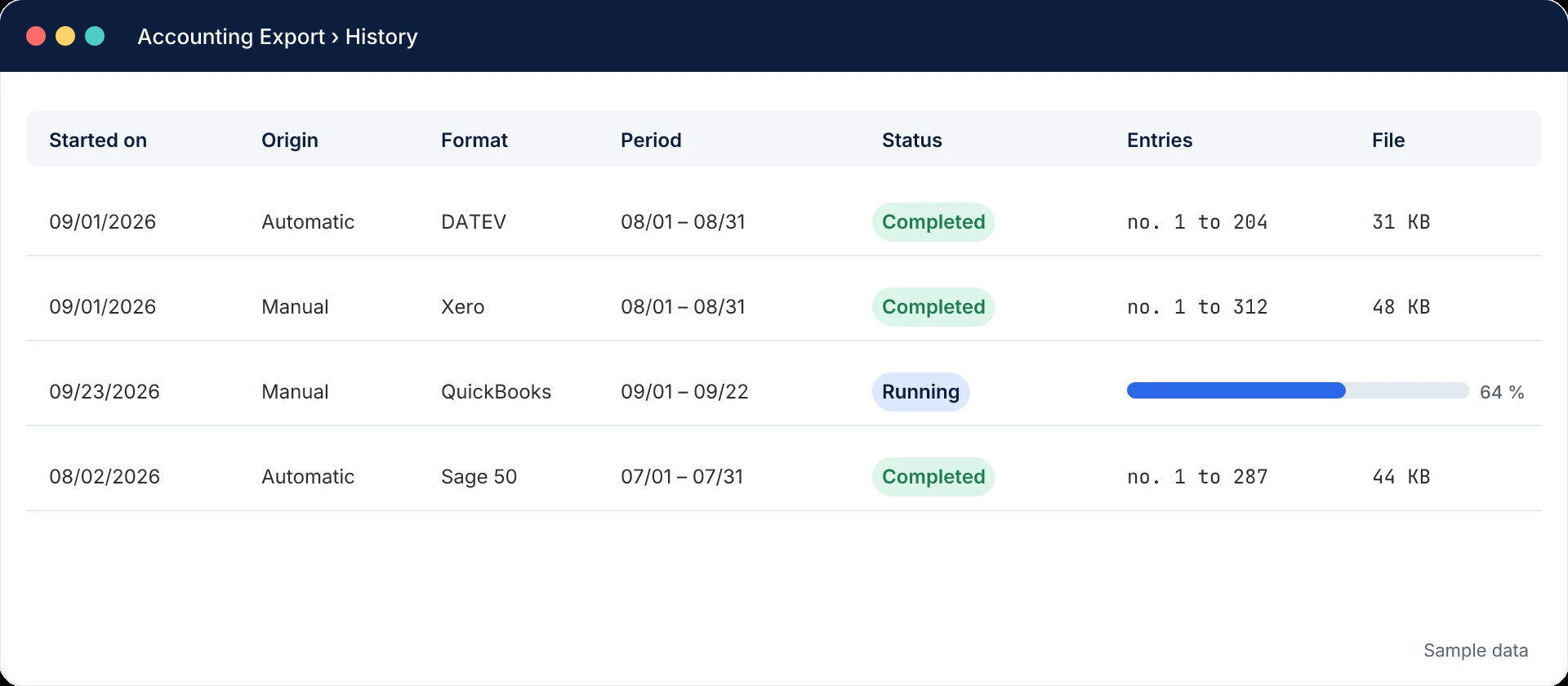
- Export. The export runs in the background; the file then waits in the history, ready to import.
Features
Double-entry, to the cent
Amounts are computed in whole cents, even when prices are entered including tax. An unbalanced entry is never exported: the order is flagged and offered again at the next export.
VAT per rate and OSS
One VAT account per WooCommerce tax class and, for B2C sales across the European Union, a dedicated account per country (One-Stop-Shop).
Sales by category
Goods and services on separate sales accounts, line by line of each order.
Payments and gateway fees
A payment entry in its own journal for each payment gateway, with the Stripe or PayPal fee booked as an expense.
Faithful credit notes
Each refund becomes a credit note split exactly like the original invoice, exported in the period of its own date.
No duplicate exports
Invoice, payment and credit note are locked separately once exported. A column in the orders list shows what is already in your books.
Background exports
Progress bar, resume after an incident, cancellation, and a history of the last 100 exports with a SHA-256 fingerprint.
Automatic monthly email Premium
On the 1st of each month, the previous month’s export is emailed as an attachment, with an alert if anything fails.
Document number
Order number, invoice number from PDF Invoices & Packing Slips, any order meta, or a generated sequence (FA-2026-00001).
Export formats and supported accounting software
| Format | Software / market | File | Version |
|---|---|---|---|
| DATEV betaSample ↓: DATEV sample file | Germany, Austria, Switzerland (Buchungsstapel EXTF 700) | .csv · semicolon | Premium |
| Xero betaSample ↓: Xero sample file | United Kingdom / international (manual journals) | .csv · comma | Premium |
| QuickBooks betaSample ↓: QuickBooks sample file | International / Europe | .csv · comma | Premium |
| Sage 50Sample ↓: Sage 50 sample file | Sage 50 / 50c | .txt · semicolon | Premium |
| SageSample ↓: Sage sample file | Sage Ligne 100 / 100cloud | .txt · semicolon | Premium |
| Exact OnlineSample ↓: Exact Online sample file | Benelux / Europe | .csv · comma | Premium |
| SAP FI/CO betaSample ↓: SAP FI/CO sample file | Enterprise / Europe | .txt · tab | Premium |
| Zoho Books betaSample ↓: Zoho Books sample file | International (manual journals) | .csv · comma | Premium |
| Holded betaSample ↓: Holded sample file | Spain | .csv · semicolon | Premium |
| Pennylane betaSample ↓: Pennylane sample file | France (journal entry import) | .csv · comma | Premium |
| EBPSample ↓: EBP sample file | EBP Compta Standard / Pro (France) | .txt · semicolon | Premium |
| CielSample ↓: Ciel sample file | Ciel Compta / Sage Start (France) | .txt · semicolon | Premium |
| FECSample ↓: FEC sample file | French standard audit file (Fichier des écritures comptables) | .txt · tab | Free |
Sample files generated by the plugin from a demo shop: one month of orders (September 2025) with invoices, payments per gateway, fees, credit notes and several VAT rates. Fictitious customers. Every file is balanced: €54,157.21 in debits and in credits. Labels are in the language of each format (German for DATEV, Dutch for Exact Online, English for Xero, QuickBooks, SAP and Zoho Books, Spanish for Holded). Download all 13 samples (zip, 104 KB) and test the import in your software before you install anything.
Built for the way your accountant imports
WooCommerce to DATEV
A real Buchungsstapel (EXTF 700) file for your Steuerberater: gross amounts on account and contra account, DATEV calculates the VAT through its automatic accounts (SKR03 8400 / 8300, SKR04 4400 / 4300), OSS sales with tax key 240, Windows-1252 encoding. DATEV details
WooCommerce to Xero
Xero’s manual journal import template, with signed amounts and one narration per transaction so Xero groups the lines. Above 300 lines, the export is split into several files delivered in a ZIP, without ever cutting a journal. Xero details
WooCommerce to QuickBooks
Journal entry CSV with Date, Transaction Type, No., Name, Account, Memo, Debit, Credit and Currency. Each entry keeps its own number, so an order’s invoice and payment stay separate. US date format available through a filter. QuickBooks details
Sage, Exact Online, SAP, Zoho Books, Holded
Sage 50 and Sage 100 journal files, Exact Online CSV with AmountDC, SAP FI/CO tab-separated postings, Zoho Books manual journals and Holded’s official template with decimal commas. All format specifications
Free or Premium?
The free version already handles all the accounting of your shop, in the French FEC format. Premium adds 12 export formats, including DATEV, Xero, QuickBooks and Sage, and the automatic monthly export.
| Feature | Free | Premium |
|---|---|---|
| Double-entry invoice entries, balanced to the cent | Included | Included |
| Discounts, shipping and additional fees on their own accounts | Included | Included |
| VAT per rate and One-Stop-Shop (OSS) per country | Included | Included |
| Payments per gateway and Stripe / PayPal fees | Included | Included |
| Credit notes split like the original invoice | Included | Included |
| Sales split by product category | Included | Included |
| Single collective customer account or individual accounts | Included | Included |
| Document number: order, invoicing plugin, order meta or generated sequence | Included | Included |
| Setup wizard: charts of accounts for France, Belgium, Germany (SKR03 / SKR04) and the United Kingdom | Included | Included |
| Export labels in English, German, Dutch, Spanish or French | Included | Included |
| Preview, background export, history, duplicate protection | Included | Included |
| FEC format (France) | Included | Included |
| 12 more formats: DATEV, Xero, QuickBooks, Sage 50, Sage 100, Exact Online, SAP FI/CO, Zoho Books, Holded, Pennylane, EBP, Ciel | Not included | Included |
| Automatic monthly export by email, with an alert if it fails | Not included | Included |
| Updates and support | Form, as availability allows | Email, within 2 business days |
14-day Premium trial, no credit card. If the trial ends without a purchase, the Premium formats and the monthly export switch off; FEC and every other feature stay. If a license is not renewed, you keep all your formats: only updates and support stop.
Premium pricing
Yearly license, updates and support included. Prices exclude VAT: tax is calculated at checkout by Freemius, our reseller.
Solo
1 site
€79 excl. VAT / year
Updates and support included for 1 year. Cancel the renewal at any time.
Most popular
Pro
5 sites
€149 excl. VAT / year
Updates and support included for 1 year. Cancel the renewal at any time.
Agency
25 sites
€299 excl. VAT / year
Updates and support included for 1 year. Cancel the renewal at any time.
14-day free trial, no credit card · 14-day refund · Secure payment by Freemius (VAT handled automatically)
Screenshots
Requirements
| Component | Minimum version | Note |
|---|---|---|
| PHP | 8.0 | Minimum required. |
| WordPress | 6.2 | Minimum required. |
| WooCommerce | 8.0 | HPOS and legacy order storage. |
| Scheduled tasks | Action Scheduler | Shipped with WooCommerce; WP-Cron as a fallback. |
Frequently asked questions
Is this a sync with DATEV, Xero or QuickBooks?
No. The plugin produces the import file of your software (journal entries) and never connects to it. There is no API key to manage, no sync that breaks, and your accountant keeps control: they import the file into the right company file, the way they already do.
Should my accountant validate the chart of accounts?
Yes, we recommend it. The predefined charts cover the usual accounts, but your real chart depends on your company, your VAT scheme and your accountant’s habits. Have the accounts validated before the first export.
Can an order be exported twice?
Not by accident: invoice, payment and credit note are locked separately once exported. To export again, untick “Exclude already exported orders”, or unlock the orders from the WooCommerce orders list.
How are refunds handled?
Each refund produces a credit note in its own journal, split over the same accounts as the invoice (category, VAT rate, OSS). An amount-only refund is spread pro rata over the original invoice.
My hosting is slow or my shop is very large: will the export fail?
The export runs in the background, in batches of 200 documents, and resumes after an interruption. On a low-traffic site, set up a system cron that calls wp-cron.php so that scheduled tasks run regularly.
Does the plugin send my accounting data to ZM Labs?
No. Entries are calculated on your server and export files are stored in a protected folder of your site. No accounting data is ever sent to ZM Labs.
What happens when my Premium license expires?
You keep every feature and every format; updates (including security updates) and support stop until you renew. See the license terms.
Can I try Premium?
Yes, for 14 days, without a credit card. If the trial ends without a purchase, the 12 Premium formats and the monthly export switch off; FEC and every other feature remain available.
How do I upgrade from the free version to Premium?
Install and activate the Premium version: the free version is deactivated automatically. Your settings, export history and order locks are kept. See the documentation.
Documentation and changelog
Installation, settings, accounting logic, formats, troubleshooting: everything is documented in detail.